Have you encountered this error, npm error code ERESOLVE? Right, following the setup instructions in a node app project, it was time to run npm ci. Lo and behold, the npm error code ERESOLVE error staring right into my face. Feeling confident I ask GitHub Copilot to fix my npm error. Let me share this journey.
System Used
Not a lot. Just a couple of things.
- Node v22.12.0
- Windows 11 Home 10.0.26200
The npm error code ERESOLVE Encounter
What is npm ci? It’s a clean install of the project dependencies. It installs packages from the package-lock.json. This ensures you have the exact dependencies and version listed in that file. Unlike npm install, which can install packages from the node_modules cache. Alrighty then, let’s see the error I got.
C:\workspace\shopify-app>npm ci
npm warn ERESOLVE overriding peer dependency
... more npm warn snipped...
npm error code ERESOLVE
npm error ERESOLVE could not resolve
npm error
npm error While resolving: @react-router/serve@7.14.0
npm error Found: react-router@7.13.2
npm error node_modules/react-router
npm error   react-router@"^7.12.0" from the root project
npm error   peer react-router@"^7.13.2" from @react-router/dev@7.13.2
npm error   node_modules/@react-router/dev
npm error     @react-router/dev@"^7.12.0" from the root project
npm error     peer @react-router/dev@"^7.13.2" from @react-router/fs-routes@7.13.2
npm error     node_modules/@react-router/fs-routes
npm error       @react-router/fs-routes@"^7.12.0" from the root project
npm error   2 more (@react-router/node, @shopify/shopify-app-react-router)
npm error
npm error Could not resolve dependency:
npm error peer react-router@"7.14.0" from @react-router/serve@7.14.0
npm error node_modules/@react-router/serve
npm error   @react-router/serve@"^7.14.0" from the root project
npm error   peerOptional @react-router/serve@"^7.13.2" from @react-router/dev@7.13.2
npm error   node_modules/@react-router/dev
npm error     @react-router/dev@"^7.12.0" from the root project
npm error     1 more (@react-router/fs-routes)
npm error
npm error Conflicting peer dependency: react-router@7.14.0
npm error node_modules/react-router
npm error   peer react-router@"7.14.0" from @react-router/serve@7.14.0
npm error   node_modules/@react-router/serve
npm error     @react-router/serve@"^7.14.0" from the root project
npm error     peerOptional @react-router/serve@"^7.13.2" from @react-router/dev@7.13.2
npm error     node_modules/@react-router/dev
npm error       @react-router/dev@"^7.12.0" from the root project
npm error       1 more (@react-router/fs-routes)
npm error
npm error Fix the upstream dependency conflict, or retry
npm error this command with --force or --legacy-peer-deps
npm error to accept an incorrect (and potentially broken) dependency resolution.
npm error
npm error
...snipped...Troubleshooting npm error code ERESOLVE
Upon seeing the error I scrolled up to the starting line of the error. Hmmm… what is this “npm error code ERESOLVE”? Looks like something is wrong with building the dependencies. No worries, I got GitHub Copilot running GPT6-Luna (free tier) by my side. I then tell Copilot to fix my npm ci error.

Copilot did its thing. Had several back and for with it. After like 7 attempts, no concrete solution was found. So I told copilot to stop trying to fix and restore everything back.
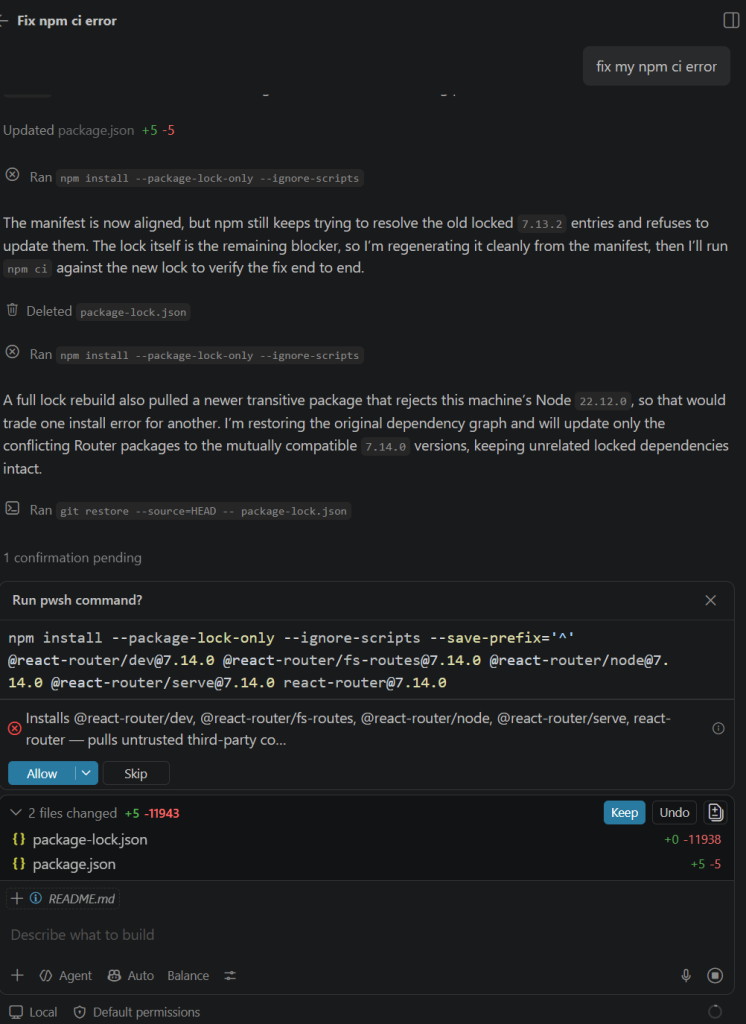
I went back to good old googling around. Stack Overflow finally gave me a clue. Why didn’t I believe right away on the npm printed output? It did say retry command with --legacy-peer-deps. I guess I needed more information before I try it.
Fixed npm error code ERESOLVE
So I tried the --legacy-peer-deps flag. What does this flag do? This provides a way of resolving overly strict peer dependencies of packages. It will cause npm to ignore peer dependencies when building a package tree. Which is what heppens on npm versions 3 through 6. Here’s how it looked like.
C:\workspace\shopify-app>npm ci --legacy-peer-deps
npm warn deprecated inflight@1.0.6: This module is not supported, and leaks memory. Do not use it. Check out lru-cache if you want a good and tested way to coalesce async requests by a key value, which is much more comprehensive and powerful.
npm warn deprecated @humanwhocodes/config-array@0.13.0: Use @eslint/config-array instead
npm warn deprecated rimraf@3.0.2: Rimraf versions prior to v4 are no longer supported
npm warn deprecated glob@7.2.3: Old versions of glob are not supported, and contain widely publicized security vulnerabilities, which have been fixed in the current version. Please update. Support for old versions may be purchased (at exorbitant rates) by contacting i@izs.me
npm warn deprecated @humanwhocodes/object-schema@2.0.3: Use @eslint/object-schema instead
npm warn deprecated node-domexception@1.0.0: Use your platform's native DOMException instead
npm warn deprecated @graphql-tools/prisma-loader@8.0.17: This package was intended to be used with an older versions of Prisma.\nThe newer versions of Prisma has a different approach to GraphQL integration.\nTherefore, this package is no longer needed and has been deprecated and removed.\nLearn more: https://www.prisma.io/graphql
npm warn deprecated eslint@8.57.1: This version is no longer supported. Please see https://eslint.org/version-support for other options.

added 748 packages, and audited 749 packages in 43s

178 packages are looking for funding
  run `npm fund` for details

47 vulnerabilities (2 low, 4 moderate, 40 high, 1 critical)

To address issues that do not require attention, run:
  npm audit fix

To address all issues (including breaking changes), run:
  npm audit fix --force

Run `npm audit` for details.I finally got my node_modules directory built and I can then npm run dev just fine.
C:\workspace\shopify-app>npm run dev

> dev
> react-router dev

  ➜  Local:   http://localhost:3000/
  ➜  Network: use --host to expose
➜ press h + enter to show helpFinal Thoughts
C:\workspace\shopify-app>npm -version
10.9.0I’m guessing if I was on npm versions 3 through 6, I would not have encountered this error. This project was probably built with a version of npm between 3 to 6. Anyway, didn’t dig deeper anymore because I already got what I wanted. In fairness to GitHub Copilot, even though it failed in fixing this error, it was successful in upgrading a couple of my Spring Boot projects. First was upgrading Apache ActiveMQ to fix a vulnerability. Second was upgrading json-flattener because of a commons-text vulnerability. The successful ones were paid GitHub Copilot subscriptions though. That makes the scoring into:
| Process | Points |
|---|---|
| Old school googling/Stack Overflow | 1 |
| GitHub Copilot Subscription | 2 |
| GitHub Copilot Free | 0 |
It is an error generated by npm when it cannot resolve peer dependencies conflicts.
Add the --legacy-peer-deps flag to your command. (e.g. npm ci --legacy-peer-deps).
npm ci --legacy-peer-deps do? This provides a way of resolving overly strict peer dependencies of packages. It will cause npm to ignore peer dependencies when building a package tree, as is on npm versions 3 through 6.
Build NodeJS Apps
Want to build NodeJS apps? Check out these articles.